Content Submission
Guidelines.
A thoughtful guide to gathering the words, images, details and ideas that will help us bring your digital project to life.

Inside This Handbook
Every chapter starts on its own page so you can read comfortably at your own pace. Click any chapter below to jump directly to that section.
Welcome! We Are Excited to Build With You
Thank you for choosing Creative Yadley. Whether we are creating a custom website, a focused landing page, or a custom application for your business, we are truly grateful for your trust.

You Don't Have to Figure Everything Out Alone
We know that gathering text, photographs, and project details can sometimes feel daunting. Please rest assured: you do not need to be a professional writer, designer, or technology expert to complete this process.
Your role is simply to share your business knowledge, your ideas, and your goals. Our team will guide you through the creative and technical decisions every step of the way.
Why Content Preparation Matters
Thoughtful design is built around your real message, not around generic placeholder text. When we have your words, photographs, and product details early, we can design every page to highlight your strengths naturally and help your visitors take action.
Our Promise to You
If you get stuck on a question or aren't sure how to describe a feature, you never have to guess. Reach out to our team anytime, and we will help you clarify your ideas so your project moves forward smoothly.
How to Use This Handbook
You do not need to complete every single item in this book. Start with the general preparation chapters (Sections 01 to 05), and then focus only on the chapter built for your specific project: Section 06 for Custom Websites, Section 07 for Landing Pages, or Section 08 for Custom Applications.
What We Need First
Core details required before your build starts, such as your business name, what you offer, your main project goal, and the written text for your pages.
Enriches Your Project
Supporting materials that add depth and personality, such as customer testimonials, website examples you admire, FAQs, and team photos.
We Can Decide for You
Design and technical choices you can comfortably leave to Creative Yadley, such as choosing fonts, picking colour combinations, or structuring menus.
Getting Ready: Setting Up Your Project Folder
Before you start writing or gathering photographs, your very first step is to create one main project folder on your computer or in the cloud. Having everything in one place makes the entire process calmer and easier for both of us.
Create One Master Google Drive Folder First
We strongly recommend creating your master project folder inside Google Drive (which is free and takes only seconds), Dropbox, or OneDrive. As you gather documents, logos, and photographs over the coming days, simply drag and drop them into your shared folder.
Best Practices for a Smooth Setup
- Work in manageable batches: You do not have to prepare everything in a single afternoon. Spend 20 minutes on your About text today, and collect your photos tomorrow.
- Keep only current versions: Remove old or duplicate drafts from your folder so our designers always work from your approved files.
- Check link permissions: When sharing a Google Drive or Dropbox link, set permissions to "Anyone with the link can view" so we can access your files right away.
What If Some Information Is Not Ready?
If something is not ready yet (for example, you are waiting on a new team photograph or finalising the price of a service), that is completely okay.
Simply leave a clear note inside your document, such as [Note: Team photo arriving Friday], and let us know what is missing so we can agree on the best way forward together.
How to Organise Your Google Drive Subfolders
Inside your main Project Content folder, creating a few simple subfolders keeps your written documents, photos, and product lists neatly separated.
Important Security Reminder: Never Put Passwords in Ordinary Documents
Please never submit account passwords, banking credentials, payment-card details, or secret API keys inside Word documents, spreadsheets, or shared cloud folders. When our team needs access to connect a payment gateway or software tool, we will guide you through official developer/team-member invitations or provide a secure handover channel.
Your Brand, Audience and Project Goals
Before we design a single screen, we want to understand the heart of your business. Answering these 13 questions in plain, everyday English helps our team shape a digital experience that fits your brand and speaks directly to your ideal customers.
Part 1: Your Business & Story
- 1. Brand / Business Name: The exact name you want displayed on your project (e.g., "Jenny's Bakery").
- 2. What Your Business Does: A simple summary of what you do in one or two sentences.
- 3. Your Target Audience: Who are you helping? (e.g., busy parents, corporate executives, local homeowners).
- 4. Products & Services: The core offerings you want visitors to discover.
- 5. Your Brand Story: How and why you started your business.
- 6. Business Values: The principles that matter most to you and your team.
- 7. What Makes You Different: Why customers choose you over other options.
Part 2: Your Experience & Goals
- 8. Desired Customer Experience: How should people feel when they visit your website or app?
- 9. Main Project Objective: What is the number-one goal of this project? (e.g., more consultations, online sales).
- 10. Desired Customer Action (CTA): What is the main button you want visitors to click?
- 11. Brand Personality: 3 to 5 words describing your style (e.g., Warm, Modern, Calm, Trustworthy).
- 12. Locations & Service Areas: Which cities, regions, or countries do you serve?
- 13. Existing SEO Keywords (If Available): Search phrases people type into Google to find a business like yours.
Practical Brand Examples & Visual Colour Guide

FitProTen Coaching
"FitProTen is a fitness brand providing online training programs for busy professionals who have limited time to visit a gym. We offer customised workout plans and nutritional guidance. Main CTA: Start My Plan."

GreenCrumb Vegan Bakery
"We are a vegan bakery creating celebration cakes, pastries, and sourdough breads without any animal products for health-conscious families. Main CTA: Order Online."
What Is a Call to Action (CTA)?
A Call to Action is the short, clear instruction on your main button that tells visitors what step to take next. Keeping it to 2 to 4 words removes guesswork:
Understanding Brand Colours & Hex Codes (Visual Swatches)
There are dozens of shades of "blue" or "green". If you have specific brand colours, sharing their six-character Hex Code (such as #AFE139) helps us match your exact shade. If you don't have colour codes yet, don't worry! Our designers will create a palette for you.
Writing Your Content: Clear, Specific & Human
When people visit a website or application, they rarely read every word from top to bottom. Instead, they scan headings, short paragraphs, and bullet points to see how you can help them. Writing in natural, everyday English is the most effective way to connect with your audience.
Written Pieces to Prepare (Where Relevant)
- Headlines & Introductions: A welcoming opening message at the top of each page.
- About Content: Your story, mission, and team member introductions.
- Service Descriptions: Clear explanations of each service, who it helps, and what is included.
- Product Descriptions: Short summaries and detailed specs for shop items.
- Testimonials & Reviews: Quotes from happy clients or customers.
- Frequently Asked Questions (FAQs): Common questions and helpful answers.
- Contact Details & Policies: Phone, email, address, privacy policy, and terms.
What Makes Website Copy Effective?
- Speak directly to your customer: Use "you" and "your" so visitors feel understood.
- Keep it concise and scannable: Break long walls of text into short paragraphs and bullet lists (aim for 300 to 800 words per page).
- Avoid industry jargon: Explain your work in plain language that anyone can understand on the first read.
- Leave the visual layout to us: You don't need to write instructions like "Put this text in a purple box below the red button." Simply label your text by page name and let our designers craft the layout.
Before & After Copy Examples
Here are two real-world examples showing how small adjustments make written copy warmer, clearer, and more persuasive.
"We leverage synergistic financial paradigms and best-in-class accounting methodologies to optimise enterprise fiscal operations."
"Spend less time on spreadsheets and more time growing your business. We handle your monthly bookkeeping, payroll, and tax filing with plain-English reports."
"We offer the best interior design services at affordable prices. Contact us today for all your home design needs."
"Our Full-Room Makeover is designed for busy homeowners. You receive a custom 3D room layout, paint and furniture selections, and a complete shopping list within 14 days."
Legally Approved Wording & Copywriting Scope
Exact or Regulated Wording: If your business has legally approved disclaimers, medical/financial compliance statements, or exact factual wording that must not be changed, please highlight it in your document as [EXACT WORDING: DO NOT EDIT].
A Note on Copywriting Scope: Professional copywriting is not automatically included in every project unless agreed in your project scope. However, you never have to worry about perfection: our team will always proofread your text, organise headings, and format your copy so it reads beautifully.
Images, Video & Visual Dimensions Explained
High-quality visuals make your brand look trustworthy and established. Below is a visual guide showing what we mean by transparent logos and image Width versus Height.
The checkerboard shows there is no solid background box behind the logo, so it sits cleanly on any dark or light section.
Logos saved as low-resolution JPEGs or phone screenshots have a permanent white rectangle trapped behind them.
Product Photography, Naming & Copyright Rules
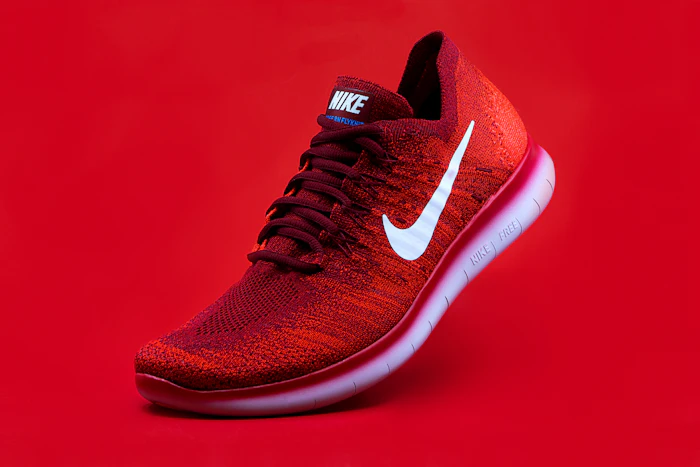
Solid, Distraction-Free Backgrounds
Our most successful online shops use well-lit product photos with solid or neutral backgrounds, sized at least 1080 × 1080 pixels. Busy backgrounds (like clutter or glitter) distract buyers from your product.

Great Photos Without a Big Budget
You can take crisp photos with a 12MP+ smartphone: stand near a bright window for natural light, steady your phone on a tripod, and shoot multiple angles.
Name Your Image Files Clearly
Instead of camera codes like IMG_4029.JPG, rename each image to describe what is in the photo:
- Blue-Tennis-Shoe-Side-View.jpg
- Founder-Portrait-Sarah.jpg
- Vegan-Chocolate-Cake-Front.webp
Descriptive filenames help us match photos to the right products and boost your Google Image SEO!
Copyright, Licensing & Permissions
Please never assume that images found on Google or Pinterest are free for commercial use. Using unlicensed photos can result in copyright claims against your business.
Only submit photos you took, commissioned, or licensed properly, and ensure you have permission from any identifiable people shown in your photos.
Custom Websites: Structure, Navigation & Services
A custom website is built from the ground up around your brand's goals. Tell us which pages you believe you need, and Creative Yadley will help refine your final menu and navigation structure.
A & B. Pages and Navigation
Common pages include Home, About, Services, Shop, Portfolio, FAQs, Blog, and Contact. These are examples rather than mandatory pages: your site only needs the pages that fit your goals.
Simply organize your written document with clear page headings (for example, "Page 1: Home", "Page 2: About") and our team will shape the cleanest navigation bar for your visitors.
C. Information for Each Service
For each service you offer, please share:
- Service Name & Description: What it is and how it helps.
- Intended Audience & Deliverables: Who it is for and what is included.
- Process & Pricing: How it works and pricing (if public).
- FAQs & Booking Steps: How a client enquires or books.
D. Products & E-Commerce (If Your Website Sells Products)
If ApplicableIf you are not selling products online, please skip this table. If you are launching an online store, placing your product list in a spreadsheet or table makes setup smooth and accurate. Include your shipping details and store return policies as well.
| Product Title | Short & Detailed Info | Category | Price & SKU | Stock & Variations | Product Image Filename |
|---|---|---|---|---|---|
| Lavender Soy Candle | Hand-poured calming candle (burn time 45 hrs) | Home Scents | $28.00 USD CND-LAV |
45 in stock Sizes: 8oz, 12oz |
Product-Lavender-Candle-Front.jpg |
| Superstar Tennis Shoes | Lightweight breathable court shoes | Footwear | $110.00 USD SHOE-BLU |
20 in stock Sizes 8 to 12, Blue |
Superstar-Tennis-Shoes-Blue.jpg |
E. Website References (Likes & Dislikes)
Feel free to share 2 to 4 websites you love (or dislike) along with a quick note explaining why. For example: "I love how spacious and calm the layout feels on this site."
Inspiration, Not Copying: References help us understand your visual taste so we can craft an original design for your brand.
F. Additional Website Functionality
Let us know if your website needs extra capabilities such as:
- Online appointment booking or scheduling.
- Custom quote or enquiry forms.
- Customer login accounts or member areas.
- Site search, subscriptions, or payment checkouts.
Landing Pages: One Offer, One Focused Goal
A landing page is a standalone web page designed around one specific offer, campaign, or conversion goal. To keep visitors focused on taking action, landing pages remove top navigation bars and competing distractions.
Practical Example of a Landing Page Content Outline
Headline, 2-sentence explanation of the offer, hero image or mockup, and your primary Call to Action button.
2. The Problem & Benefits:
A short paragraph showing you understand the visitor's challenge, followed by 4 bullet points highlighting the benefits.
Tangible details (for example: "60-minute live workshop + downloadable workbook") and pricing/dates.
4. Social Proof & Final Action:
2 to 3 client testimonials, 3 quick FAQs, and a final sign-up or purchase section.
The 15 Details to Prepare for Your Landing Page
- Unnecessarily long copy: Visitors bounce if they have to read an essay before understanding your offer.
- Competing calls to action: Don't ask visitors to "Download", "Read Blog", and "Follow on Instagram" all at once.
- Excessive form fields: Only ask for what you truly need (usually just Name and Email).
- Unclear offers: Make sure visitors know within 5 seconds what they will receive.
- Unsupported claims: Pair bold promises with real testimonials, examples, or clear facts.
- Irrelevant distractions: Avoid top navigation menus that lead visitors away from your campaign goal.
Custom Applications: Explaining Your Vision
Your role is to explain the problem, the people involved and the result you want. We will work with you to translate those needs into a practical application experience.
A. The Problem & B. Intended Users
- What problem should the app solve? What currently takes too much time, or feels frustrating and inefficient?
- Who will use the application? Will it be used by your customers, employees, administrators, managers, members, or service providers?
C. User Capabilities & D. Workflows
- What should users be able to do? Register, sign in, view info, submit requests, make bookings, upload documents, make payments, track progress, or approve requests.
- Describe the workflow from start to finish: What happens step by step when someone takes an action?
E. Data, F. Payments & G. Scheduling
- E. Information & Data: What records need to be stored, updated, or deleted, and who can access them?
- F. Payments & Transactions (if needed): One-time payments, subscriptions, deposits, refunds, or invoices.
- G. Bookings & Scheduling (if needed): Appointment slots, staff availability, locations, reminders, and rescheduling.
H. Notifications, I. Tools, J. Reports & K. Sketches
- H. Notifications: What happens when a form is submitted, a payment succeeds/fails, or a deadline approaches?
- I. Existing Tools & J. Reports: Any calendars, spreadsheets, CRMs, or activity dashboards needed?
- K. Sketches & Examples: Share screenshots, spreadsheets, or hand-drawn sketches of your idea!
Features, Payments and Integrations
When requesting extra features across any service category, simply tell us the practical outcome you want rather than worrying about which software plugin or technical method to use.
| Capability | What to Share With Us (Desired Outcome) | Common Examples |
|---|---|---|
| Payment Gateways & E-Commerce | How customers pay (one-off, deposit, or subscription) and which currencies you accept. | Stripe (cards, Apple Pay), PayPal |
| Booking Systems | Services offered, appointment lengths, availability hours, and buffer times. | Consultations, classes, calendar sync |
| Email & Marketing Automation | Where form leads should go and whether an automatic welcome email should be sent. | Mailchimp, ConvertKit, Klaviyo |
| Accounts, Memberships & Forms | What members see after signing in, or what fields your enquiry form should collect. | Client portals, intake forms, analytics |
How to Connect Stripe or PayPal Safely
Never send us your private banking password. In both Stripe (under Settings → Team → New User) and PayPal (under API Access), you can invite [email protected] with Developer Access so we can connect your checkout safely while your funds remain private to you.
Scope, Timing & Pricing
Please note that additional functionality or third-party integrations are not automatically included in every project. Specialised features may affect project scope, timing, and pricing, so we will always review and agree on them with you upfront.
Organising and Submitting Your Content
Once your materials are gathered inside your main project folder, a quick five-minute review ensures our team can begin work smoothly without back-and-forth delays.
Helpful Filename Examples
- About-Page-Draft.docx
- Founder-Portrait.jpg
- Service-Consulting-Description.docx
- Product-Lavender-Candle-Front.jpg
Where to Submit Your Content
Please submit your shared folder using the submission link or client-area instructions supplied specifically for your project.
Be sure to mark which documents are final and approved, and note any items that are still pending.
Final Checklists: Universal & Custom Websites
Checklist 1: For All Projects
Checklist 2: Custom Websites
Checklist 3: Landing Pages
Checklist 4: Custom Applications
Frequently Asked Questions
1. Do I need to write all my content myself?
Unless professional copywriting is included in your project scope, we ask you to provide the core text about your business. Don't worry about perfection: our team will proofread and format your words nicely.
2. What if I do not have a logo or brand guide?
That is completely fine! A brand guide is never mandatory. If you don't have a logo yet, we can create a clean typographic placeholder and select harmonious colours and fonts for your project.
3. Can I prepare content in batches?
Yes! Prepare your files in manageable steps inside your cloud folder at your own pace, then share the folder link with us once your materials are gathered.
4. What if some information is not ready yet?
If something is not ready yet, that's okay. Just leave a note in your document letting us know what is missing so we can agree on the best way forward.
5. Can I change content after submission?
Yes, minor text adjustments and swaps can be made during your scheduled review rounds. Submitting complete drafts upfront simply keeps your build moving smoothly.
6. Can I share examples of websites or apps I like?
Absolutely! Sharing links or screenshots along with what you like (or dislike) about them is a wonderful way to show us your style preferences.
7. What if I don't know which features I need?
You never have to make technical decisions alone. Just explain what you want your customers or team to accomplish, and Creative Yadley will recommend the best solution.
8. Where do I submit my content & get help?
Use the project submission link or client-area instructions provided for your project. Whenever you need help, email us at [email protected].
Ready When You Are.
Let's Build Together.
Take your time going through this guide, gather what you have ready, and remember that our team is always here to support you. You bring the ideas, knowledge, and vision. We will help you turn them into a thoughtful digital experience.
Reach out anytime: no question is too small. Whether you want us to review a draft document or talk through an idea, we are happy to help.
© Creative Yadley. All rights reserved. Prepared exclusively for Creative Yadley clients. Please do not copy, modify, or redistribute this publication without written permission.